Technical Support
Online Documentation
When you have a question, first consider the Help system in your product (use the Help Menu, the F1 key, or the Help button “?”). There are over 1500 pages of documentation in CarSim that can be quickly searched using the Search Help item from the Help menu.
If your software contract is currently in maintenance you can receive technical support via our online support center or telephone.
Online Support
The most efficient way to get technical support is by submitting a ticket with our Support Center:
You will require a Mechanical Simulation Account to submit a ticket. If you do not already have one, you may register here:
Training
Mechanical Simulation schedules basic courses for using our software that are open to all customers currently in maintenance. To sign up for a course, please use the link(s) below and register.
If you are interested in a more specialized or advanced training class, at our location or yours, please contact your account manager: Bob McGinnis or Alan Rudnick.
Engineering Services
Although our main business is to provide the best software in the field, we can also help with specialized projects involving our software:
Web Resources
This website has a Users section with updates, technical memos, downloadable examples, and news about reported bugs and workarounds. This section of the website requires a Mechanical Simulation Account. If you do not already have one, you may register here:
Telephone Support
Call (734) 668-2930 and ask for technical support. Please have the following information available:
- Your name, phone number, email address, and company name.
- Your Key ID (see sidebar about the Key ID).
- Your software version (Help -> About ...), plus the version for any software you are using to extend the math models (for example, Simulink).
- A detailed description of your problem and the steps you took to arrive at your questions.
End of Support Schedule
This schedule indicates the dates that Mechanical Simulation will stop providing technical support for certain software and Operating Systems. VehicleSim products (BikeSim, CarSim, SuspensionSim and TruckSim) may continue to function with third-party software after the End of Support date, but Mechanical Simulation will no longer offer technical support or guarantee its functionality.
What Is a Key ID?
Your Key ID is used by Mechanical Simulation to determine your license type and maintenance status. You will be asked for the Key ID when logging into the Users section of the website or when requesting technical support.
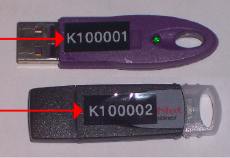
Dongle Keys
Your KEY ID is printed on the dongle.
All Users
From the browser (carsim.exe, bikesim.exe, or trucksim.exe)
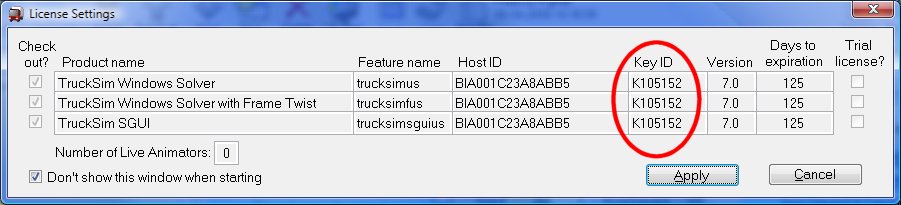
use the Tools->License
Settings menu
item to bring up a window showing your Key ID and other information.